Small Business Website Guide 2026: How to Turn Visitors Into Calls and Bookings
Quick Summary
8 min read- 01
Part 2 of The Art of Organic Growth, a seven-part series on getting customers without paying for every click.
- 02
Short answer: Most local customers decide who to contact in under half an hour, and they compare only two or three businesses. Your website has a few seconds to answer four questions: do you...
- 03
BrightLocal's 2026 Consumer Search Behavior Survey of 1,227 U.S. consumers found that 75% decide which local business to use in under 30 minutes, and 28% decide in under five. Most people...
- 04
That changes what a website is for. It isn't a brochure people browse. It's the place a shortlisted customer confirms the decision, or rules you out. In the same research, 52% of people had...
Part 2 of The Art of Organic Growth, a seven-part series on getting customers without paying for every click.
Short answer: Most local customers decide who to contact in under half an hour, and they compare only two or three businesses. Your website has a few seconds to answer four questions: do you do what I need, where, for roughly how much, and how do I reach you right now. The sites that win load fast on a phone, have a page for each service and area, show prices and proof, make calling or booking a two-tap job, and answer enquiries in minutes. Everything else is decoration.
01You have minutes, not days
BrightLocal's 2026 Consumer Search Behavior Survey of 1,227 U.S. consumers found that 75% decide which local business to use in under 30 minutes, and 28% decide in under five. Most people look at three businesses or fewer.
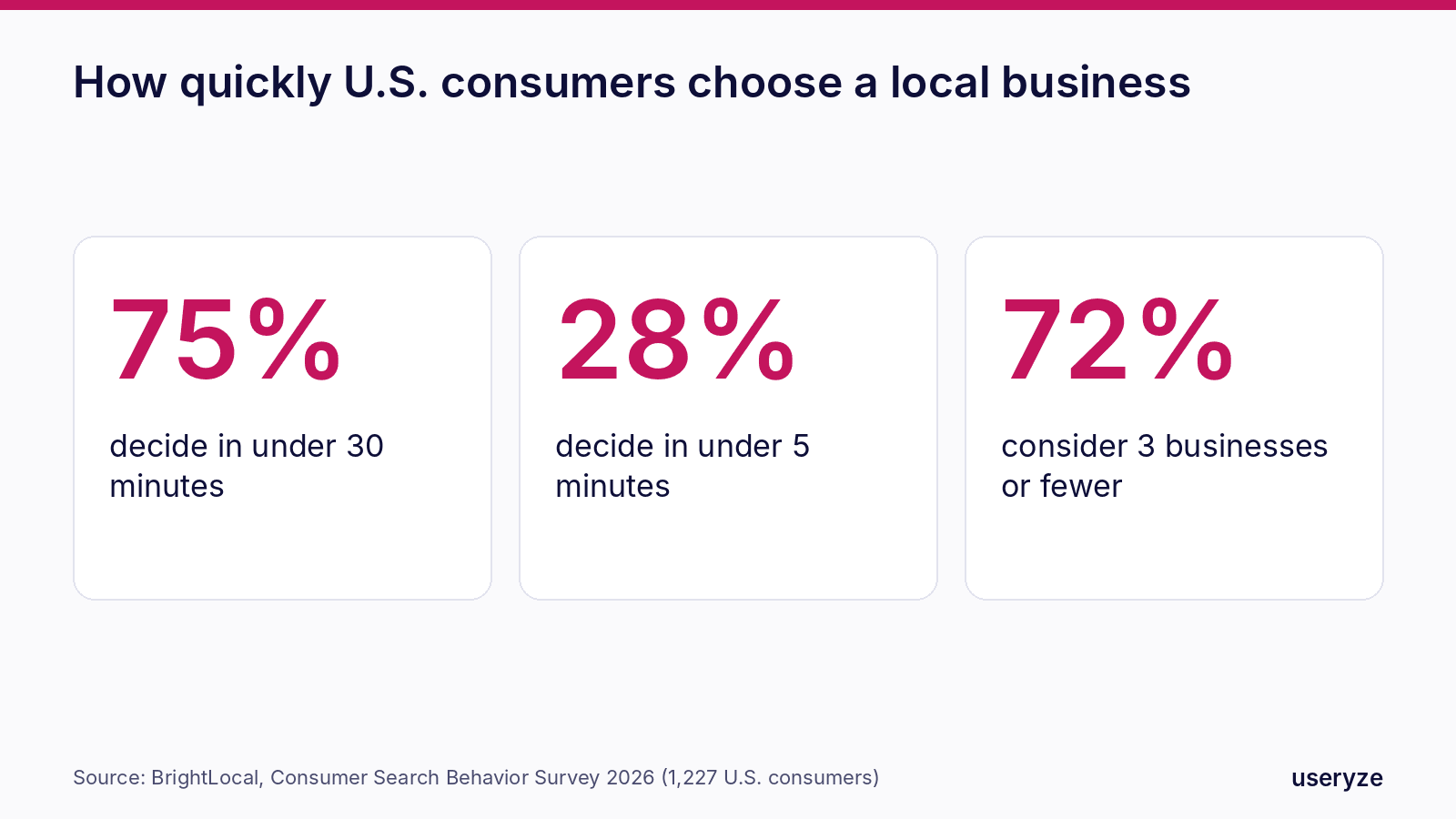
That changes what a website is for. It isn't a brochure people browse. It's the place a shortlisted customer confirms the decision, or rules you out. In the same research, 52% of people had looked at a business in their latest search and then chosen not to contact it.
What makes people pick you
When BrightLocal asked consumers why they contacted the business they chose, the top answers were about clarity, not design: clear and complete information, the most or best reviews, and clear pricing or a deal. A quick response to an enquiry beat a professional-looking website.
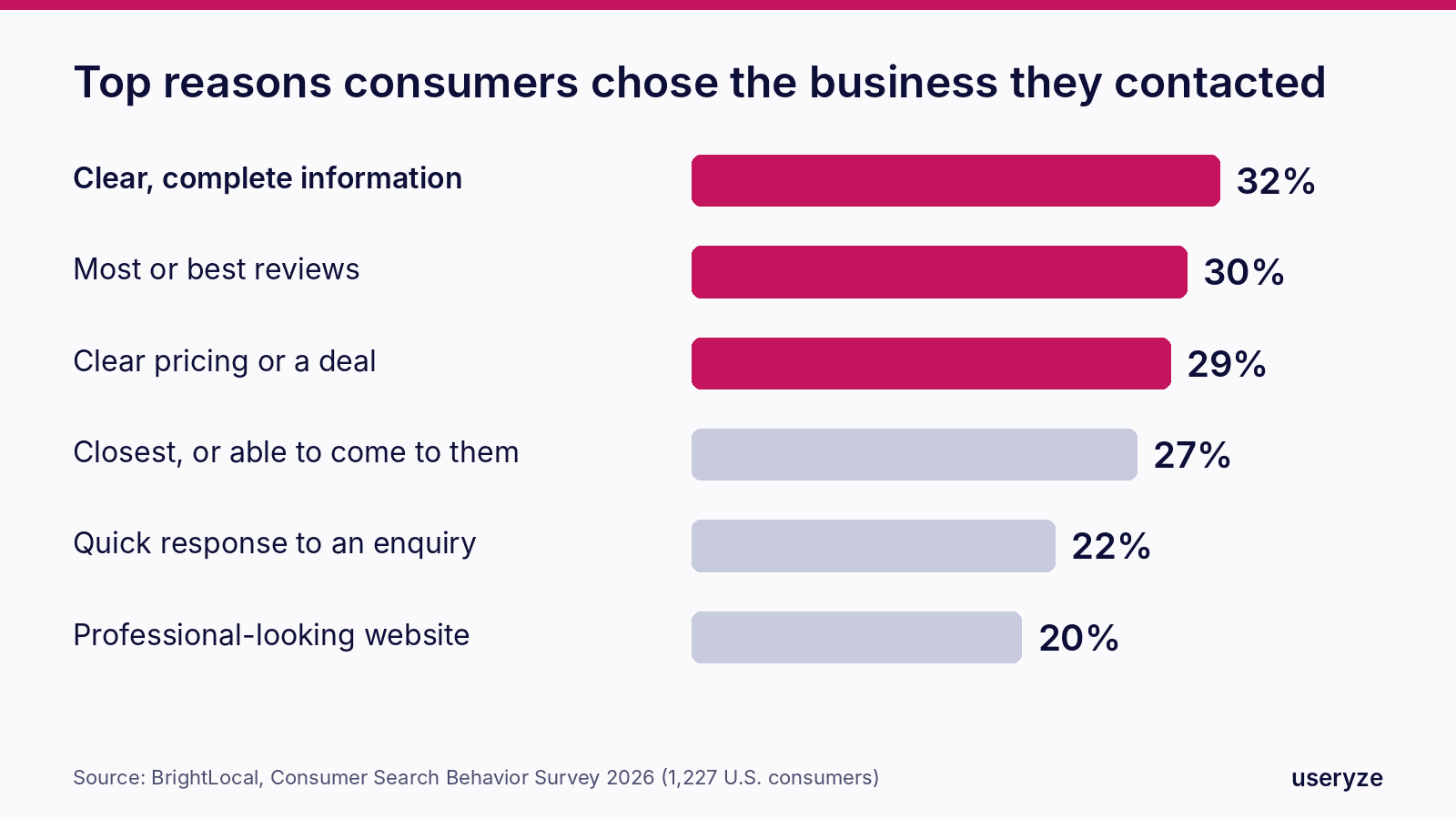
The website still matters: 20% chose a business partly because its site looked professional, and 18% decided not to contact a business because they couldn't find a website at all. But a beautiful site that hides the price, the service area or the phone number loses to a plain one that doesn't.
Step 1: Make it fast on a phone
Most visits now come from phones. Contentsquare's 2026 benchmark, built from 99 billion sessions, puts mobile at almost 70% of all web traffic, while desktop still converts 74% better. That gap is mostly friction: slow pages, tiny buttons and long forms.
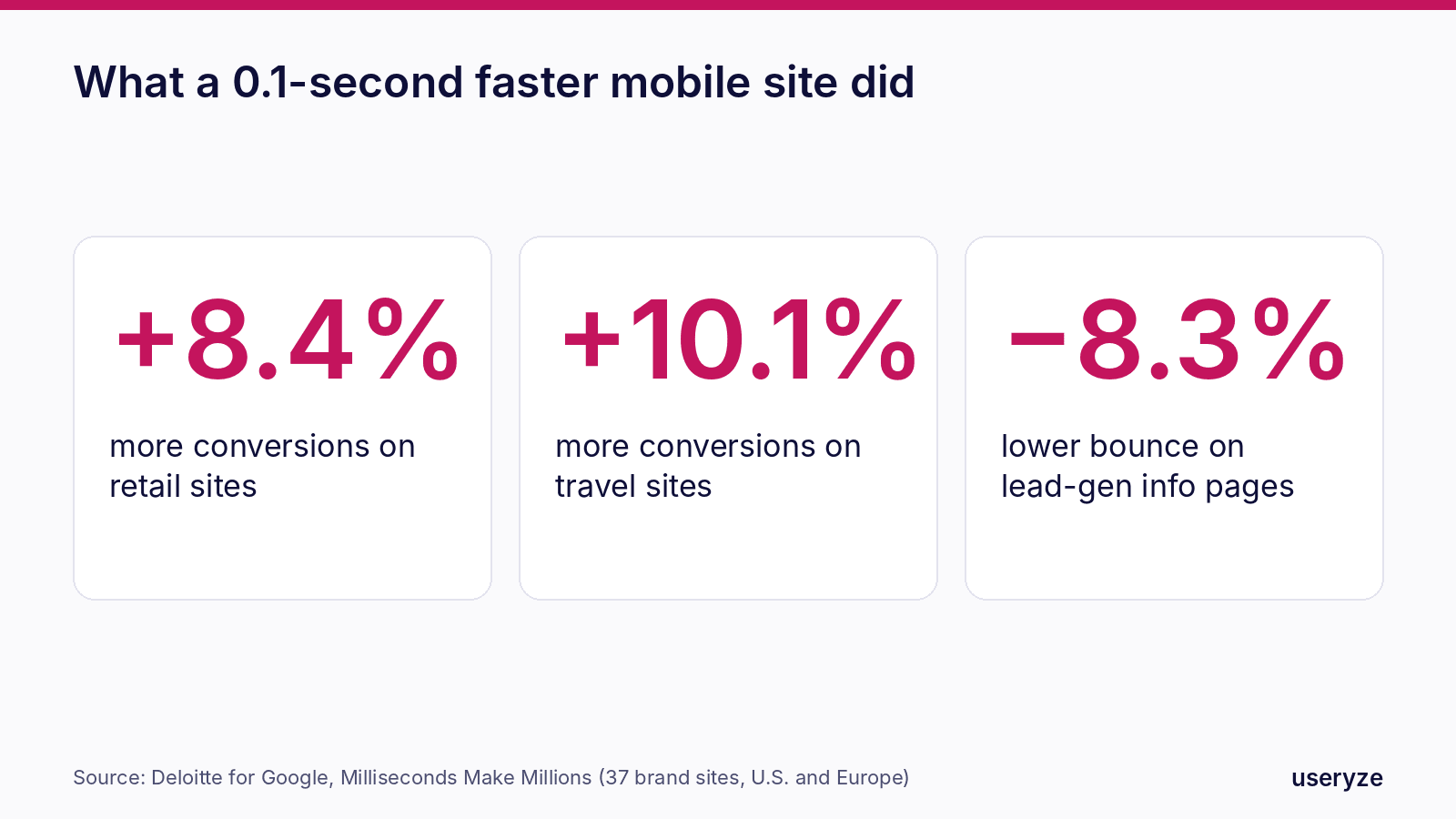
Speed is the cheapest fix. A study commissioned by Google and run by Deloitte found that making a mobile site just 0.1 seconds faster lifted conversions by 8.4% for retail sites and 10.1% for travel sites, and cut bounce rates on lead-generation information pages by 8.3%.
What to do:
- Test your key pages in Google's PageSpeed Insights on mobile. Aim for the Core Web Vitals "good" thresholds: the main content loads in 2.5 seconds or less (LCP), the page responds to taps within 200 milliseconds (INP), and nothing jumps around as it loads (CLS under 0.1).
- Shrink images. Export photos as WebP or AVIF at the size they're shown, not straight off the camera.
- Cut the extras. Every chat widget, slider, pop-up and tracking script costs time. Keep the ones that earn money.
- Choose decent hosting with a CDN. Cheap shared hosting is often the single biggest delay.
Step 2: One page per service, and per area you serve
A single "Services" page with a bulleted list can't rank for "emergency plumber in Round Rock" or convince someone who searched for it. Give each main service its own page, and if you serve several towns, give the important ones a page too, written for that place: the neighborhoods, the drive time, the jobs you've done there.
Each page should answer, near the top:
- What exactly you do, in the words customers use, not trade jargon.
- Where you do it, with the towns or neighborhoods named.
- Roughly what it costs, as a starting price, a range or "free quote in 24 hours." Clear pricing was a top-three reason people chose a business.
- What happens next, in one line: "Call now and we'll be there today" or "Book a 15-minute call."
These pages also feed AI tools. ChatGPT and Google's AI Mode draw on your website as well as your profile and listings, which is why BrightLocal's 2026 advice is to keep the site up to date and consistent with them. Specific, consistent pages make you easier to recommend.
Step 3: Put proof where the decision happens
People check reviews before they contact you, and 88% of those who get an AI recommendation verify it first. Don't make them leave your site to do it.
- Show your Google rating and a few recent reviews on the homepage and on each service page, ideally reviews that mention that service.
- Add real photos of your team and your work. Stock images undo the trust your reviews build.
- Show licenses, insurance, certifications, guarantees and years in business where they matter to the buyer.
- Use case examples with real results only when you have the customer's permission. Never invent testimonials or numbers.
Step 4: Make contacting you a two-tap job
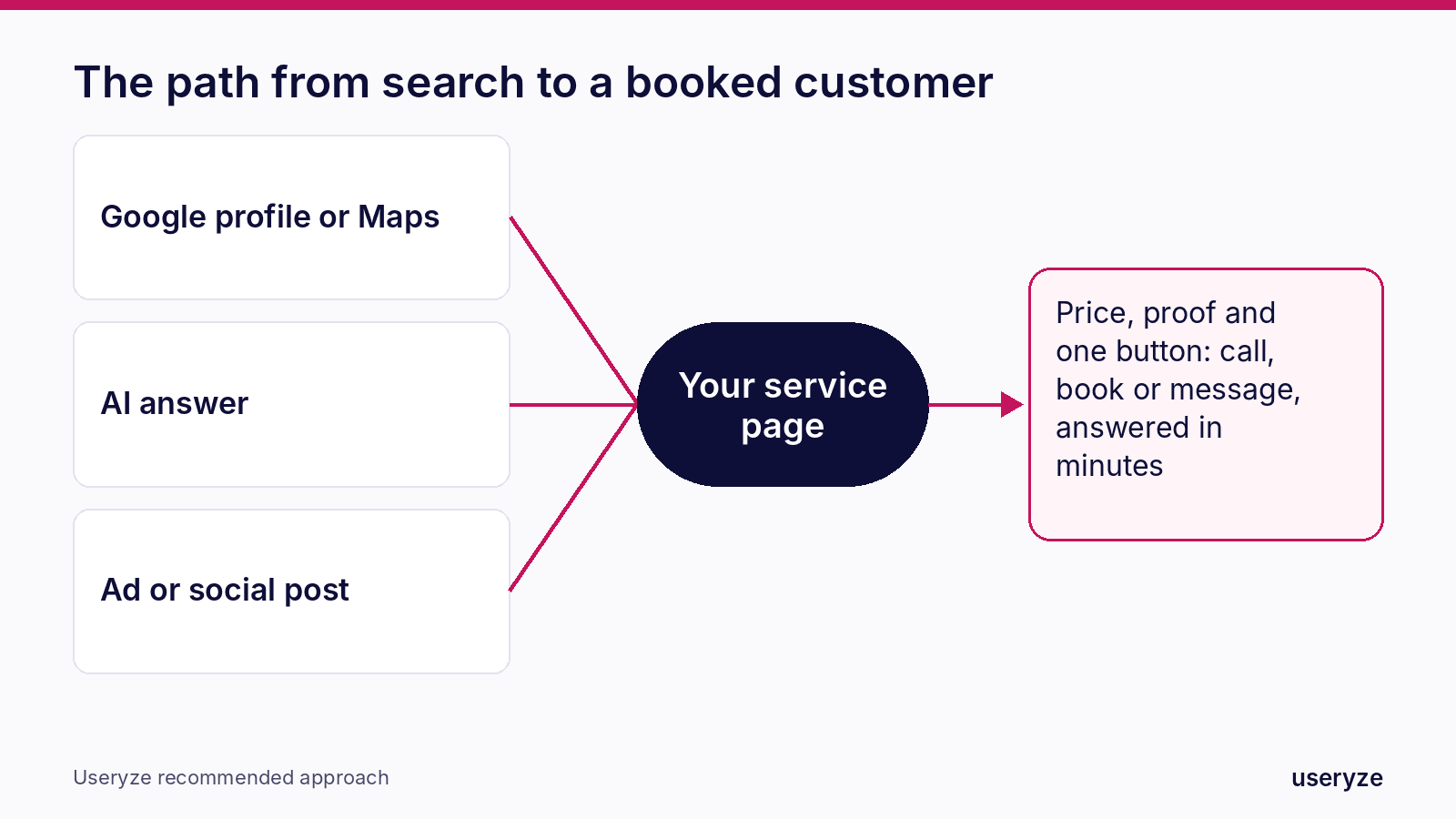
- Tap-to-call phone number in the header of every page on mobile, and keep it visible as people scroll.
- One clear button per page: call, book or get a quote. Not five competing options.
- Short forms. Name, phone or email, and one question about the job. Ask the rest later.
- Online booking if your work allows it, connected to your real calendar so people only see times you're free.
- Messaging by text or WhatsApp for people who won't call.
- Hours and service area stated plainly, so nobody wonders whether you're open or whether you come to them.
Step 5: Answer in minutes
A quick response to an enquiry was a bigger reason to choose a business than a professional-looking website. With most decisions made inside 30 minutes, a reply that arrives the next morning usually arrives after the customer has booked someone else.
Set up an instant text or email confirmation for every form, route calls so they don't hit voicemail during business hours, and have a follow-up for anyone you miss. This is what our AI follow-up service does: every new enquiry gets a reply in minutes, and the hot ones go straight to your phone.
Step 6: Measure leads, not traffic
Visits don't pay the bills. Set up tracking for the actions that do: calls from the site, form submissions, bookings and clicks on your phone number, email and directions. In Google Analytics 4 these are key events. Watch a few session recordings in a free tool like Microsoft Clarity to see where people hesitate, rage-click or give up. Then fix the worst page first.
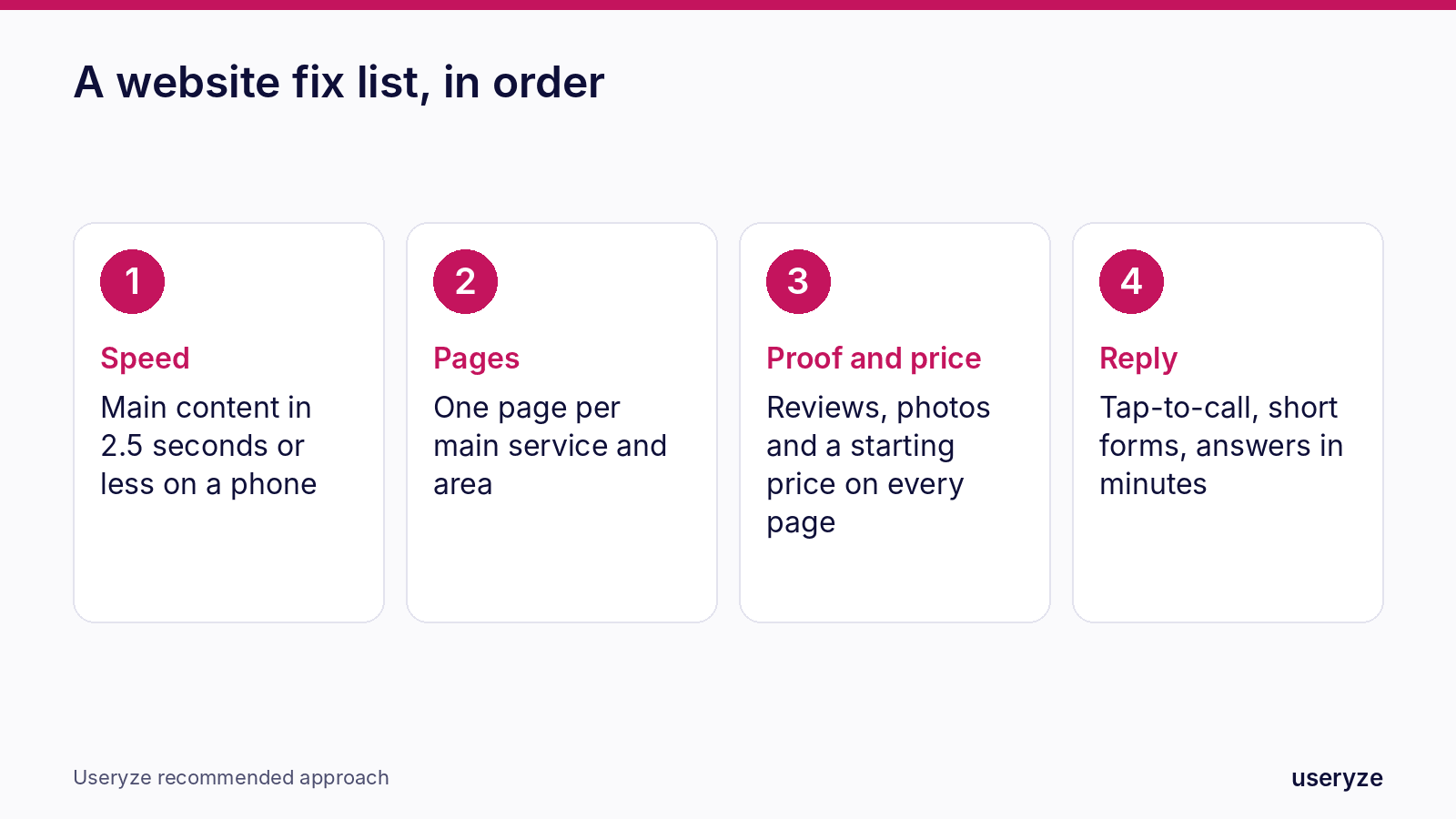
A one-afternoon website checklist
- Speed: run PageSpeed Insights on your homepage and top service page; compress the biggest images.
- Phone: check that the number is tap-to-call and visible on every mobile page.
- Pages: list your top three services and top three towns; note which have no dedicated page.
- Price and proof: add a starting price or range and two recent reviews to each service page.
- Forms: cut every form to four fields or fewer and test that you actually receive the submissions.
- Tracking: confirm calls, forms and bookings are recorded as key events in GA4.
When to get help
If your site is slow no matter what you trim, built on a theme you can't change, or missing the service and area pages you need, it's usually faster to rebuild than to patch. Our website design team builds fast, mobile-first sites around the pages that bring leads, conversion optimization finds where your current site loses people, and local SEO gets those pages found.
Up next: Part 3, Facebook: how to use your page and local groups to get recommended by the people your customers trust.
FAQ
How fast should a small business website load? Aim for the main content to appear within 2.5 seconds on a phone, which is Google's "good" threshold for Largest Contentful Paint. A Deloitte study for Google found that even 0.1 seconds faster lifted mobile conversions by 8.4% for retail sites.
Should I put prices on my website? Yes, at least a starting price or range. Clear pricing was one of the top three reasons consumers chose a local business in BrightLocal's 2026 research.
Do I need a separate page for every service? For your main services, yes. A dedicated page can rank for that specific search and answer that customer's questions, which a single list of services can't do.
How quickly should I respond to website enquiries? Within minutes during business hours. Three in four consumers choose a local business in under 30 minutes, so a slow reply often means the job has gone elsewhere.
Sources
- BrightLocal: You have less than 30 minutes to win a customer (Consumer Search Behavior Survey 2026)
- BrightLocal: How consumers decide which local business to use (Consumer Search Behavior Survey 2026)
- BrightLocal: Local Consumer Review Survey 2026
- Contentsquare: 2026 Digital Experience Benchmarks, conversions
- Google and Deloitte: Milliseconds Make Millions
- Google: Core Web Vitals
Free growth plan
Turn this into more customers.
We run marketing, video and AI follow-up for owner-led businesses. Tell us about yours and we will show you the three fixes that matter most.
Keep reading
- Best Open-Source Enterprise CMS Platforms Compared (2026)Payload, Strapi, Drupal, Wagtail, Umbraco and Directus compared for enterprise use: licenses, stacks, SSO, hosting and which fits your team.
- Headless CMS for Marketing Agility: Powering Dynamic Content with Payload CMSHow a headless CMS powers dynamic content marketing, and how Useryze uses Payload CMS to drive more reach and remove busywork.
- Conversion Optimization for Local Retail Websites: Turn Browsers into BuyersPractical CRO for local retail websites, from mobile UX to checkout, to turn local store traffic into sales.