Instagram for Local Business 2026: How to Turn Reels, Stories and Your Profile Into Bookings
Quick Summary
6 min read- 01
Part 4 of The Art of Organic Growth, a seven-part series on getting customers without paying for every click.
- 02
Short answer: Instagram rewards content people watch to the end and send to a friend, not content with the most likes. It now lets local businesses test Reels on non-followers before they...
- 03
People use Instagram to decide where to go. SOCi's 2026 Local Discovery Index, a survey of more than 1,000 U.S. consumers, found that 55% use social media to find local businesses and that...
- 04
For restaurants, salons, gyms, jewelers, home services and anything visual, Instagram is often where a shopper sees what you're like before they ever visit your website.
Part 4 of The Art of Organic Growth, a seven-part series on getting customers without paying for every click.
Short answer: Instagram rewards content people watch to the end and send to a friend, not content with the most likes. It now lets local businesses test Reels on non-followers before they hit the main feed, and since July 2025 public posts from business accounts can appear in Google search. Win by posting original short videos built around one clear idea, using Trial Reels to find what lands, writing captions that read like search answers, and making your profile a place where people can book or message in one tap.
01Why Instagram matters for local businesses
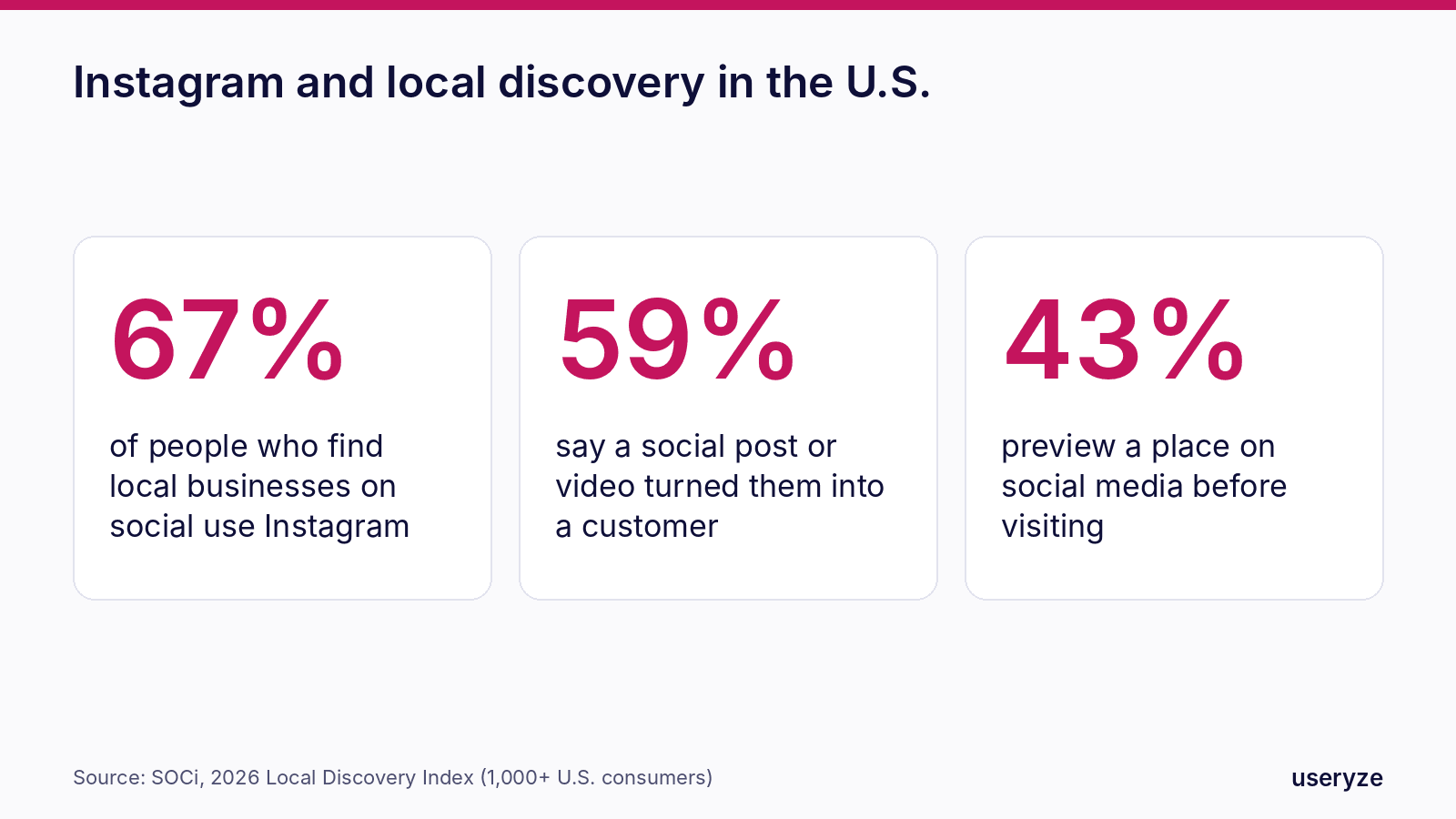
People use Instagram to decide where to go. SOCi's 2026 Local Discovery Index, a survey of more than 1,000 U.S. consumers, found that 55% use social media to find local businesses and that 67% of those social searchers use Instagram. In the same survey, 59% said a social post or video had turned them into a customer of a local business.
For restaurants, salons, gyms, jewelers, home services and anything visual, Instagram is often where a shopper sees what you're like before they ever visit your website.
Step 1: Understand what Instagram rewards
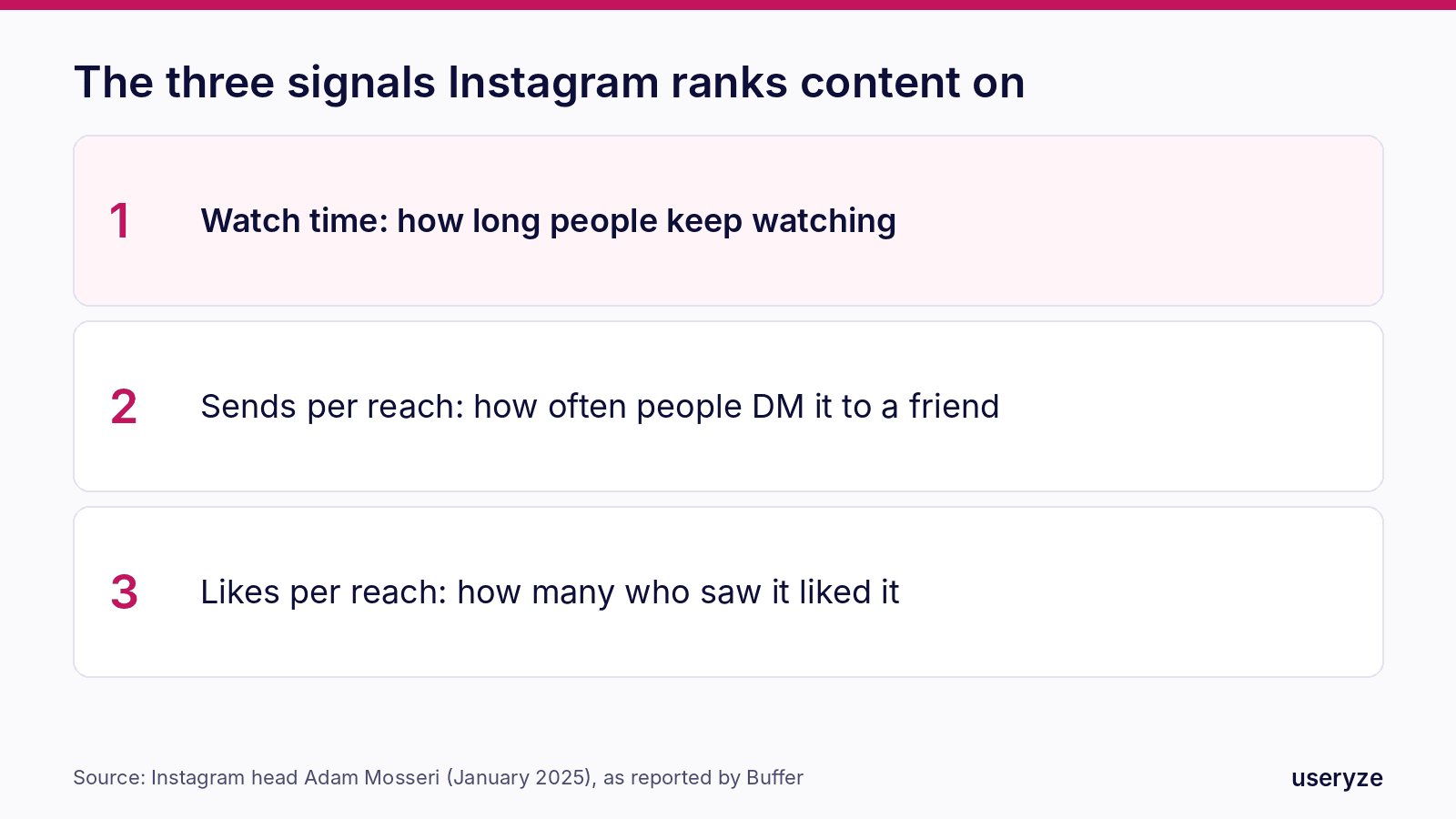
Instagram head Adam Mosseri has named the three signals that matter most for ranking: watch time, likes per reach and sends per reach. Likes count slightly more with people who already follow you; sends, when someone shares your post with a friend in a direct message, count slightly more for reaching people who don't.
In practice that means:
- Hold attention. Put the payoff in the first two seconds and cut every pause. A 15-second Reel watched to the end beats a 60-second one people leave.
- Make it worth sending. Useful tips, a surprising before-and-after, or something that answers "where should we go Friday?" get forwarded.
- Be original. Instagram, like Facebook, reduces the reach of reposted content and videos with another app's watermark. Film your own.
Step 2: Test Reels on new people first
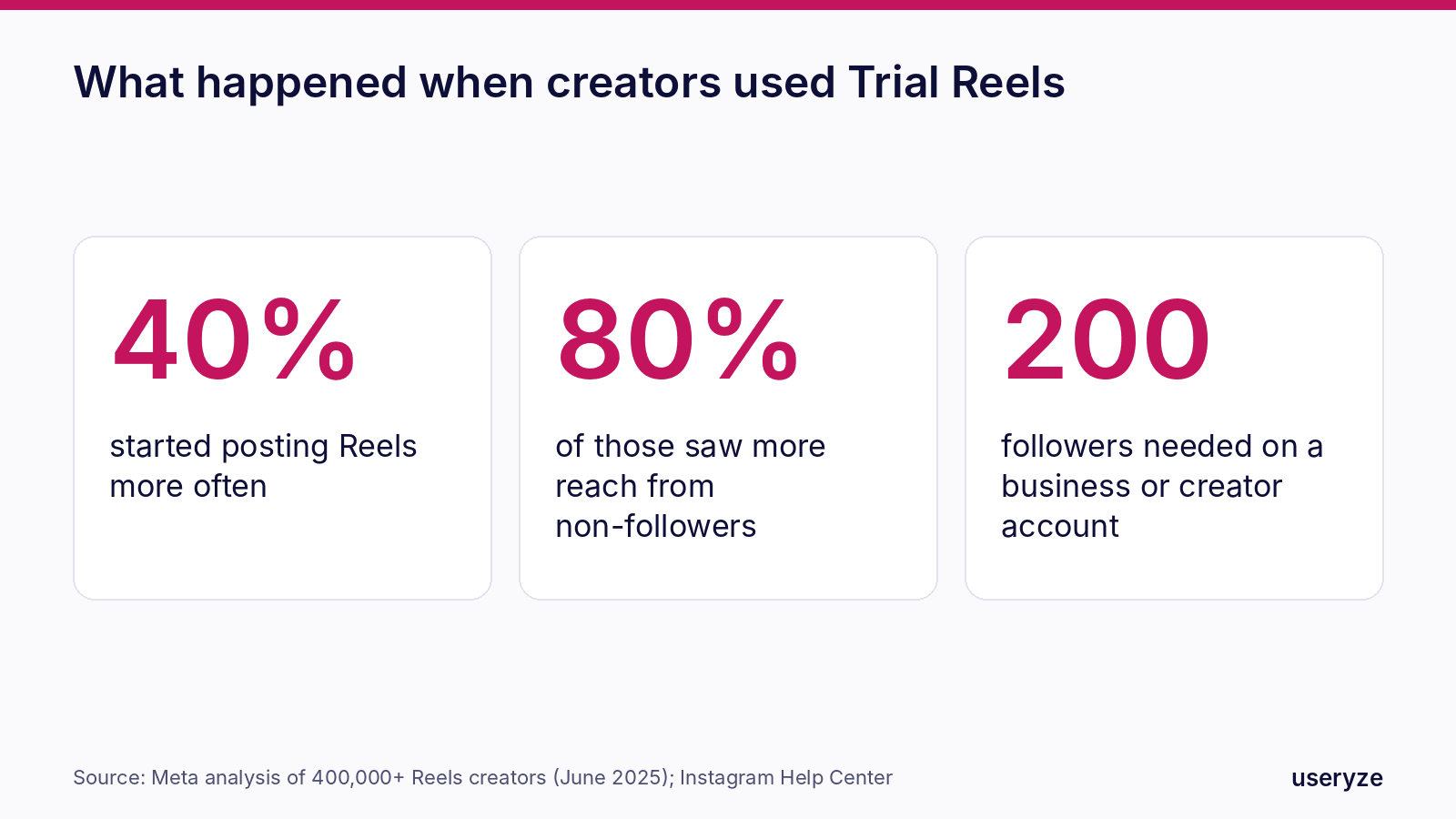
Trial Reels let you show a Reel only to people who don't follow you, see how it performs, and then decide whether to share it with your followers. They're available to public business and creator accounts with at least 200 followers. Meta reported that among creators who tried Trial Reels, 40% started posting Reels more often, and 80% of that group saw more reach from non-followers.
For a local business, that's a free focus group:
- Post two versions of the same idea with different first lines and see which keeps people watching.
- Try formats you'd never risk on your main grid, such as a quick tutorial or a staff Q&A.
- Share the winners with your followers and use them as ads later.
Step 3: Write for search, inside Instagram and on Google
People search Instagram the way they search Google: "brunch south austin," "engagement rings round rock," "kitchen remodel ideas." And since July 2025, public photos and videos from business and creator accounts can appear in Google and Bing results, unless the account turns that setting off.
- Name and username: include what you do and where, such as "Luna Bakery | Austin cakes."
- Bio: one line on what you offer, your neighborhood or service area, and your action.
- Captions: start with the plain words people search for, then the story. Write "Custom engagement rings in Round Rock" before "We love this one!"
- Alt text and location tags: add them on every post. They help both Instagram and search engines understand what's in the picture and where.
- Keep the setting on: in your account's privacy settings, leave search-engine visibility on so good posts can be found on Google.
Step 4: Use Stories and Highlights for the people who already care
Reels find new people; Stories keep the people who already follow you close. Use them for what's happening today: today's special, a slot that just opened, a finished job, a customer's reaction. Then save the evergreen ones as Highlights, such as menu, prices, reviews, before-and-after, FAQ and how to book, so new visitors can answer their own questions on your profile.
Step 5: Make your profile a booking page
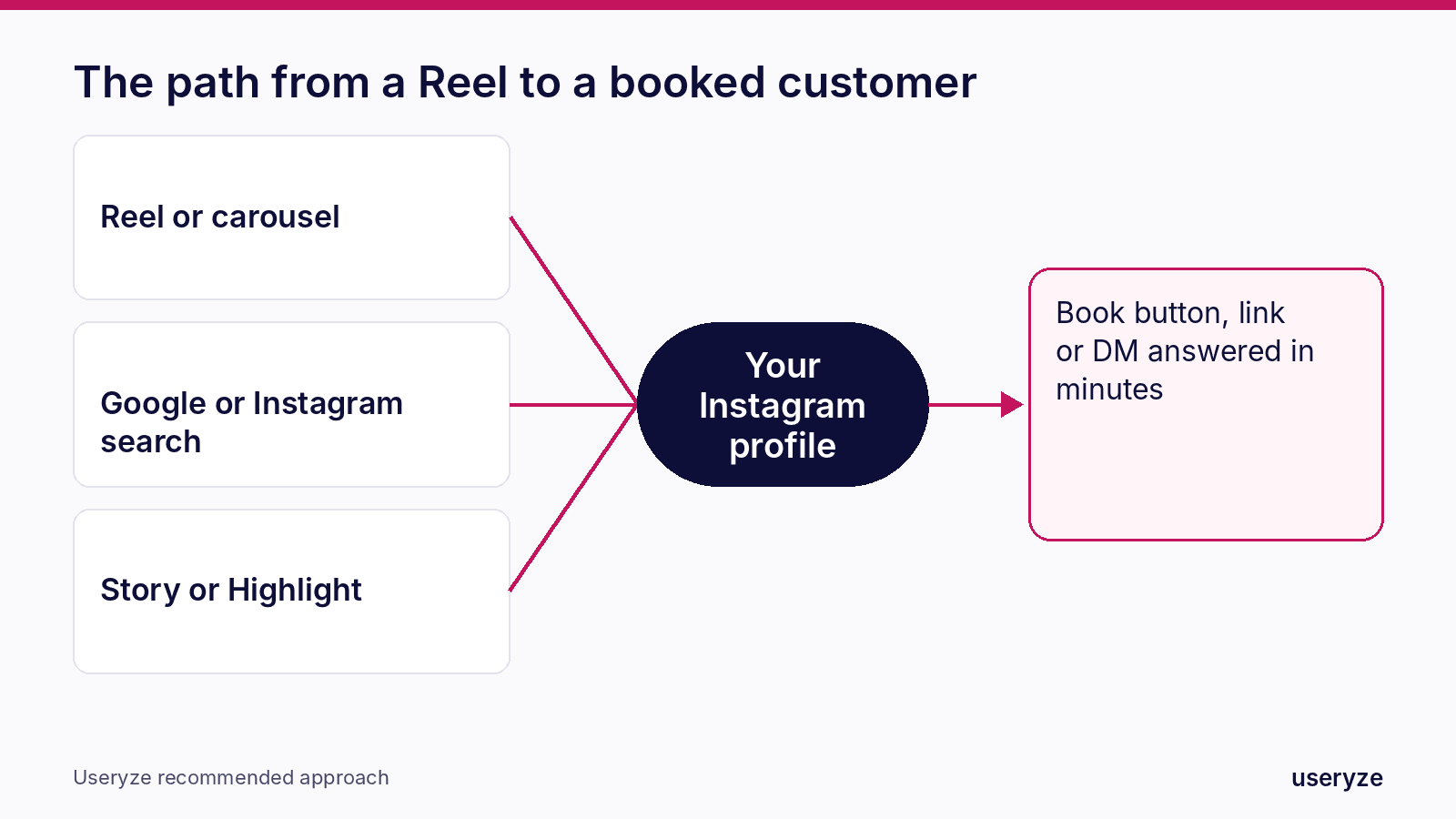
- Action buttons: add Book, Order, Call or Contact so people can act without leaving the app.
- Link: point it to the page that converts, such as booking, ordering or a quote form, not just your homepage.
- Pinned posts: pin three posts that answer "Is this place for me?": your best work, your prices or menu, and a customer review.
- Direct messages: reply within minutes during business hours. Set up saved replies for common questions, and route new leads into your CRM so nobody waits. Our AI follow-up does this automatically.
Step 6: Measure what turns into customers
Follower count tells you little. Each month, check which posts and Reels produced profile visits, link taps, button taps and messages, then make more of those. Tag the link in your bio so bookings from Instagram show up separately in your analytics, and ask new customers how they found you.
When a Reel performs well organically, it's usually your best ad. Our paid media team can turn proven Reels into local campaigns, and our content team can film and edit them for you.
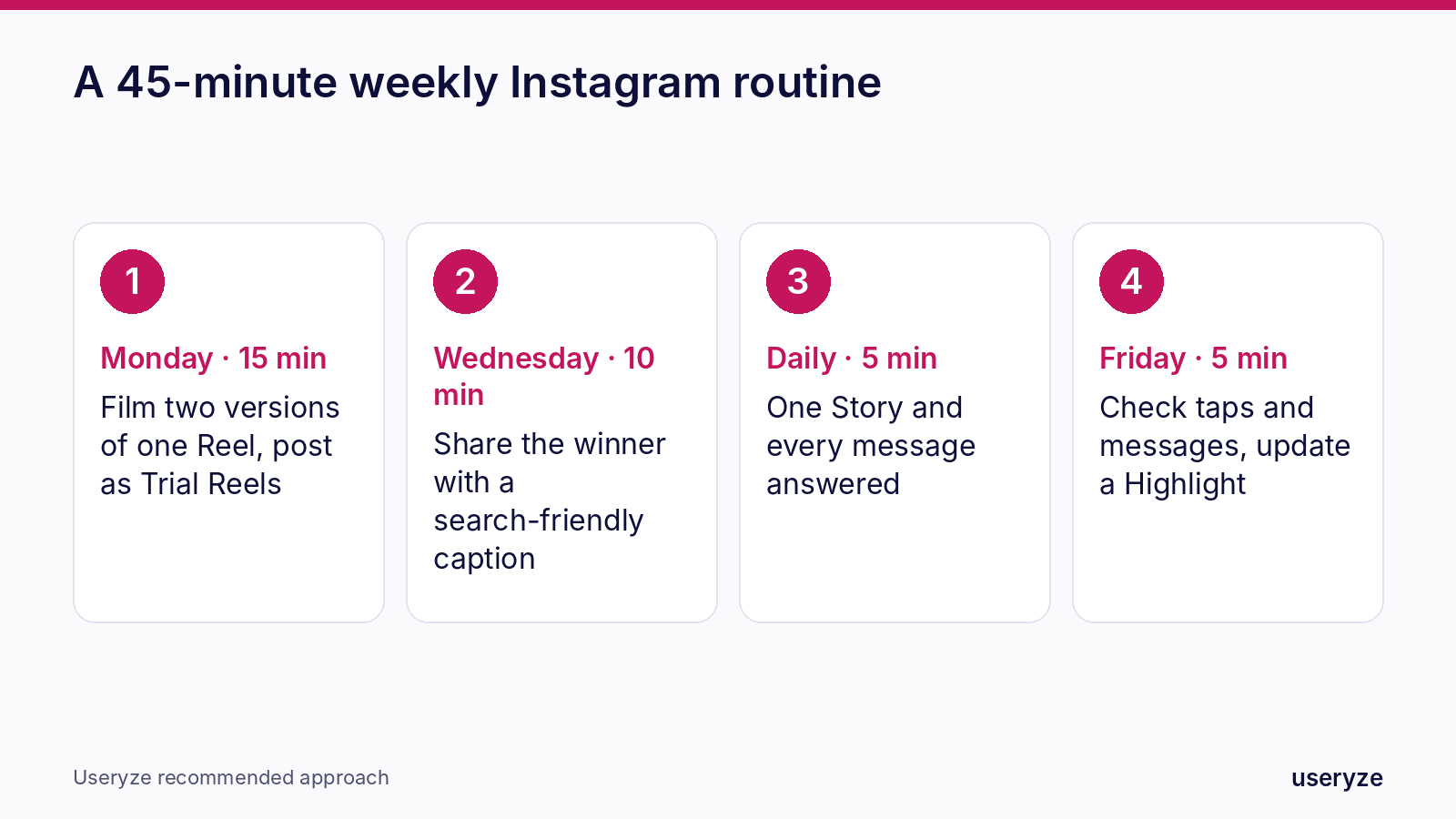
A 45-minute weekly Instagram routine
- Monday (15 minutes): film two short Reels on one idea with different openings; post both as Trial Reels.
- Wednesday (10 minutes): share the winner with your followers, with a search-friendly caption, location and alt text.
- Every day (5 minutes): post one Story about what's happening today and answer every message.
- Friday (5 minutes): check which posts led to profile visits, taps and messages; update a Highlight.
Up next: Part 5, TikTok: how local businesses get discovered on the app people now use like a search engine.
FAQ
What matters most for reach on Instagram in 2026? Watch time, sends and likes, each measured against how many people saw the post. Instagram head Adam Mosseri has named these as the most important ranking signals.
What are Trial Reels? Reels shown only to people who don't follow you, so you can test an idea before sharing it with your followers. They're available to public business and creator accounts with at least 200 followers.
Can my Instagram posts show up on Google? Yes. Since July 2025, public posts from professional accounts can appear in Google and Bing results unless you turn the setting off.
How often should a local business post on Instagram? Consistency matters more than volume. One or two strong Reels a week plus daily Stories is a realistic rhythm for most small businesses.
Sources
- SOCi 2026 Local Discovery Index, reported by MarTech (October 2026)
- Buffer: How the Instagram algorithm works (2026), on Adam Mosseri's three ranking signals
- The Week: Instagram posts and Reels can now appear in Google and Bing searches (July 2025)
- ValueYourNetwork: Instagram reach features 2026, on Meta's Trial Reels findings
- CreatorFlow: Instagram trends 2026, on Trial Reels eligibility
Free growth plan
Turn this into more customers.
We run marketing, video and AI follow-up for owner-led businesses. Tell us about yours and we will show you the three fixes that matter most.
Keep reading
- YouTube for Local Business 2026: How Videos and Shorts Win Trust, Search and AI AnswersHow local businesses use YouTube in 2026: answer videos with chapters, Shorts, embeds on service pages and the videos AI answers cite.
- Headless CMS for Marketing Agility: Powering Dynamic Content with Payload CMSHow a headless CMS powers dynamic content marketing, and how Useryze uses Payload CMS to drive more reach and remove busywork.
- The Useryze Connected Data Loop: Integrating Ads, Social, POS & CRM for GrowthDiscover how Useryze’s connected marketing data loop links Google, Meta, and TikTok ads with social, POS, Shopify, and CRM data for full-funnel SMB growth.